While I was studying for my computer science degree, I took a special topics course that focused on virtualization. I found the concept of running many other systems on one physical computer to be fascinating, and since then I’ve used virtual machines (VMs) for work and for personal projects. To those unfamiliar, virtualization is a computer science concept where one or more layers of abstraction are used to allow more efficient use of computing resources. U.S. National Institute of Standards and Technology (NIST) defines virtualization in a few Special Publication (SP) documents, notably:
NIST Special Publication 800-125: Guide to Security for Full Virtualization Technologies
Virtualization is the simulation of the software and/or hardware upon which other software runs. This simulated environment is called a virtual machine (VM). There are many forms of virtualization, distinguished primarily by computing architecture layer.
NIST Special Publication 800-125A Revision 1: Security Recommendations for Server-based Hypervisor Platforms
A methodology for emulation or abstraction of hardware resources that enables complete execution stacks including software applications to run on it.
In this blog post, we’ll look at a brief history of virtualization and a few examples of where virtualization is seen today.
Mainframes: Tabulation & Time-sharing
Virtualization has its roots in mainframe-based computing. Back in those days, computer hardware was expensive, and if only a single user could run a single program, the return on investment (ROI) was very low because the hardware could not be used efficiently. Because of this, International Business Machines (IBM) developed its mainframes to allow “time-sharing,” a method of hardware resource sharing permitting multiple users to utilize the system’s computing resources simultaneously, providing more value to the business and using the hardware’s capacity as much as possible.
Time-sharing can be traced back to the punchcard tabulation era. IBM, at the time known as the Computing-Tabulating-Recording Company (C-T-R), realized there was significant demand for its tabulating machines, especially in precision-focused areas such as payroll, billing, and scientific computing. However, due to the cost of these machines, many firms were wary of the capital expenditure required to purchase their own hardware. Thomas J. Watson, Sr., who served as IBM’s president for over four decades and is the namesake for IBM’s Watson supercomputer, envisioned a system where entities that needed something computed would submit their punchcard data to a special bureau. The bureau would process the cards using IBM’s tabulation machines, produce a result, and send the result back to the user, with IBM charging a fee for this service. In essence, data processing time on IBM’s tabulating machines was shared across many users. Eventually, the time-sharing concept would develop into a system allowing concurrent users of a mainframe to leverage compute capacity without their work interfering with one another.
In 1964, IBM debuted virtualization technology as part of a research project for its System/360 (S/360), called CP-40. This work, and later projects like CP-67, would influence IBM’s first commercial virtualization product, called VM/370, for the System/370 mainframe, first available in 1972. VM/370 allowed not only multiple users and programs to share the system, but also multiple operating systems to run in parallel, each in their own isolated environments. IBM continued to refine and expand its virtualization offerings with products such as VM/SP, VM/ESA, and the modern z/VM, which remains actively maintained today.
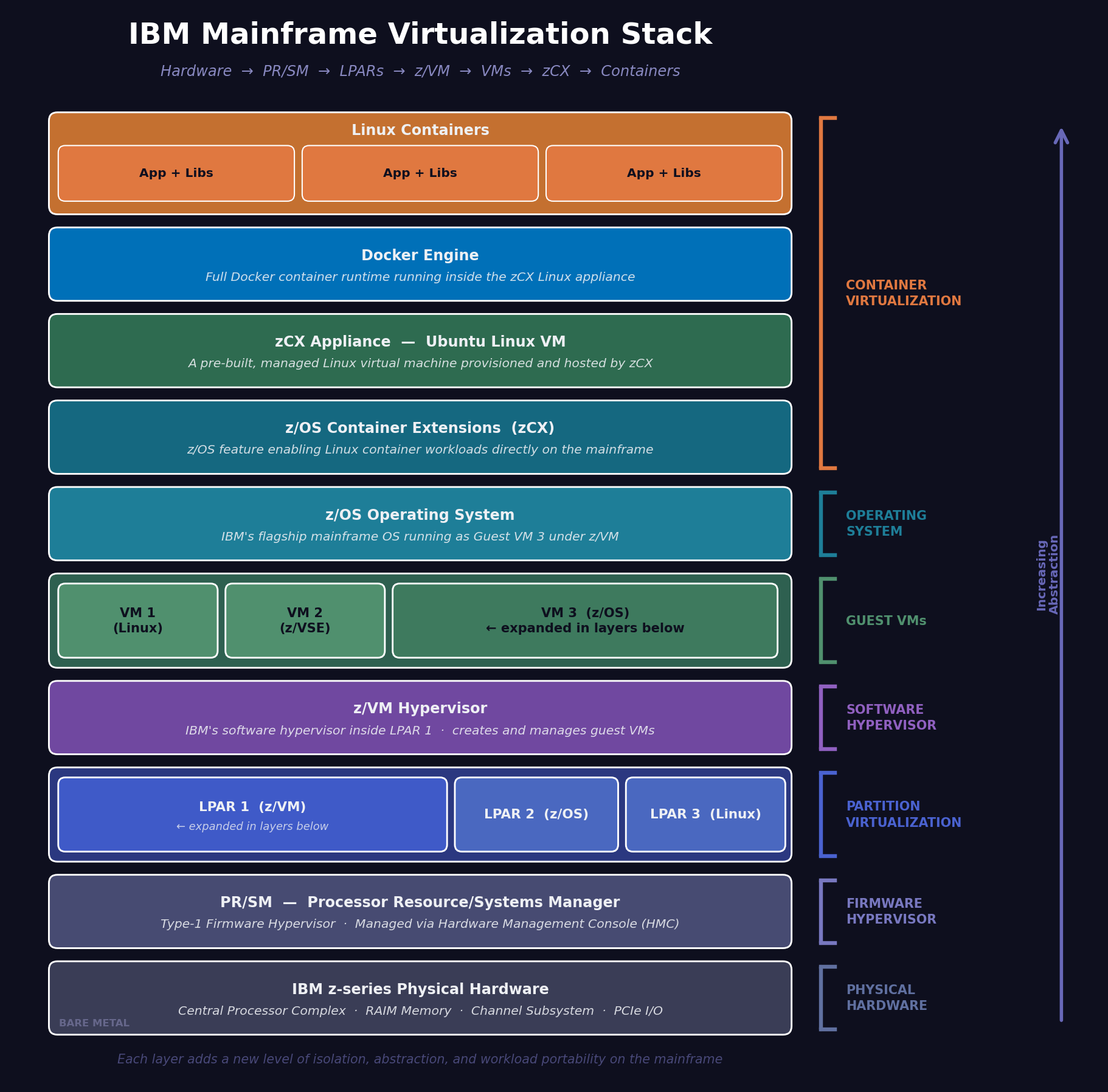
IBM mainframes can leverage three related but distinct levels of virtualization: Logical Partitions (LPARs), Virtual Machines (VMs), and containers (we will touch on containers later in the post). LPARs are defined at the system’s firmware level via the Processor Resource/Systems Manager (PR/SM) facility to divide up (i.e., “partition”) and assign hardware resources (CPU, memory, storage, I/O devices, and so on) to what are effectively separate mainframes on a single physical system. Each LPAR can run its own mainframe OS (z/OS, z/VM, z/VSE, z/TPF, even Linux on IBM Z). VMs function like they do on other, non-mainframe platforms: they are created, executed, and managed by a product like z/VM. In practice, the system stack looks like this: Hardware → PR/SM → one or more LPARs → z/VM → one or more VMs.
Hardware Virtualization
Founded in 1998, VMware (today a subsidiary of Broadcom) began developing a product that allowed a single Intel-based computer to run several VMs, each with a compatible desktop or server OS. This was a significant feat considering the Intel x86 processor architecture did not natively support VMs at the time. By 1999, VMware launched its commercially successful VMware Workstation 1.0, a popular tool with software developers because they could write, debug, and test code in different, isolated operating environments such as Windows and Linux. VMware entered the enterprise space in the early 2000s with its ESX Server (and its stripped-down variant, ESXi Server) and GSX Server (also known by the names “VMware Server” and “VMware GSX Server”) offerings.
ESX and ESXi operate as a “Type-1” hypervisor, running directly on the hardware and offering considerable VM performance with little overhead. By contrast, GSX operated as a “Type-2” hypervisor — running as a user process on the system like any other software under the control of a host OS, such as Windows or Linux — akin to the likes of VMware Workstation, Oracle VM VirtualBox, Microsoft Virtual PC, and Parallels Desktop for Mac. Unlike those desktop hypervisors, which are more consumer, student, or hobbyist-oriented products, GSX allowed for commercial-grade features such as VM sharing and remote access without the higher cost of ESX or ESXi. GSX Server has been fully discontinued and unsupported by VMware/Broadcom since 2011. However, many of its most compelling features were incorporated into VMware Workstation starting with version 8.0.
Seeing the need for better virtualization support, Intel Corporation and Advanced Micro Devices (AMD) developed updates to the x86 (32-bit) and x86_64/AMD64 (64-bit) architectures for running VM hypervisors in the form of Intel VT-x and AMD-V between 2005 and 2006. Intel’s VT-d and AMD’s AMD-Vi implemented Input-Output Memory Management Units (IOMMUs). To put it simply, IOMMU technology permits direct passthrough of hardware capabilities to VMs running on the host. A perfect example of this would be hardware-assisted 3D graphics support from a high-end Graphics Processing Unit (GPU) exposed to a VM for graphically intensive workloads, such as a video game or 3D modeling work. The mobile equivalent for ARM-based devices is ARM's virtualization architecture, specifically the Virtualization Host Extensions (VHE) introduced in ARMv8.1-A, and ARM's System Memory Management Unit (SMMU), ARM's implementation of IOMMU for its CPUs.
Additional developments by Intel to increase VM performance include Extended Page Tables, allowing for more efficient management of system memory used by VMs. These improvements with CPU and memory management architecture were key enablers for Microsoft to develop its own VM hypervisor, called Hyper-V. Initially, Hyper-V was released for enterprise use starting in Windows Server 2008. It was later released as a client-side hypervisor product beginning with Pro and Enterprise versions of Windows 8/8.1. Today, Hyper-V is available in every currently supported Windows Server release and with Pro and Enterprise versions of Windows 10 and 11.
Virtualization extends well beyond the desktop and server hardware space. Software-defined Networks (SDNs) use virtualization technology to abstract network traffic from the underlying hardware, cabling, and signaling infrastructure. To put it in simple terms, SDNs allow network administrators to use software for managing their networks, including routing, switching, Quality of Service (QoS), flow controls, firewall rules, and bandwidth scaling without having to manually configure each of these aspects of their network per device (i.e., individual routers, switches, gateways, and firewalls). Thanks to virtualization, SDNs separate a network’s control plane from its data plane, allowing a network’s logical “topology,” or data flows and routing, to be flexible. Additionally, SDNs make administering a network that uses different vendors of networking equipment, such as Cisco, NETGEAR, and Juniper Networks, significantly easier.
Paravirtualization & Emulation
The University of Cambridge released its Xen hypervisor in the early 2000s as an open-source software project. Unlike other virtualization software, where the computer hardware is abstracted such that you can install and boot a supported operating system with little difficulty, Xen utilized paravirtualization, requiring the guest OS to be modified to work with the hypervisor. While this was a much heavier initial lift, paravirtualization also provided some benefits. Notably, a guest OS in a Xen VM would allow for greatly reduced hardware emulation, offering performance improvements nearing bare-metal (a.k.a., “native”) capabilities as if the OS were directly installed on the host hardware. Since its early releases, Xen has been improved upon and now provides full hardware-assisted virtualization similar to what VMware, Microsoft, and Oracle offer, eliminating the need for guest OS modifications.
A few years later, Qumranet (later acquired by Red Hat, now a subsidiary of IBM) released its open-source Kernel-based Virtual Machine (KVM) project, allowing for the creation, execution, and management of VMs on Linux-based hosts. In 2007, KVM was fully merged as part of the Linux kernel with the release of Linux 2.6.20. Red Hat/IBM actively maintain the KVM project to this day. It’s worth noting that KVM cannot function as a hypervisor alone; it exists only within the Linux kernel and its memory space. To be used as a proper hypervisor, KVM must be paired with a user-facing (what is called “userspace”) component to create and manage virtual machines and to emulate hardware. For this purpose, one of the most popular choices is QEMU.
Quick EMUlator (QEMU), written by Fabrice Bellard, is an open-source software project that serves multiple purposes such as a machine hardware emulator, a hypervisor, or a Virtual Machine Monitor (VMM) to other hypervisors. When used as an emulator, it effectively mimics a particular CPU platform, allowing programs compiled for one architecture to run on a different architecture. A simple example of this would be a program written to run on an ARM-based device being executed on an Intel-based PC. When used as a hypervisor, QEMU can run complete VMs with their own guest OSes just like VMware Workstation or Oracle VM VirtualBox. Alternatively, in VMM mode, QEMU can support these and other hypervisors, such as Xen, and provide its hardware emulation capabilities to these hypervisors if they lack native support for certain CPUs, such as MIPS, PowerPC, or SPARC. In practice, QEMU is frequently paired with KVM and Linux due to a few tangible reasons:
QEMU can run complete virtual machines on its own, but it’s a pure software-only approach that has some very real performance costs due to translating the guest CPU’s instructions to those of the host CPU.
KVM can take advantage of the host CPU’s virtualization extensions (Intel VT-x/AMD-V), circumventing QEMU’s software-only translation bottleneck while leveraging QEMU’s device emulation capabilities.
QEMU, KVM, and Linux are all free and open-source projects that naturally pair well together.
While QEMU is frequently used with KVM, KVM can use other userspace emulation software as well. Some notable ones include:
Google’s crosvm, which allows containerized Linux applications to run on Google’s web-focused operating system, ChromeOS.
The open-source Cloud Hypervisor, originally created by Intel and now maintained by The Linux Foundation.
Amazon Web Services’ (AWS) Firecracker, which powers AWS Lambda (serverless functions) and AWS Fargate (serverless compute engine for containers).
Mobile Virtual Machines
In 2022, Google released the Android Virtualization Framework (AVF), based on a special, security-hardened variant of KVM called protected KVM (pKVM). The purpose was to provide a means to run fully isolated VMs on an Android-powered device. This might seem a bit crazy since many Android devices tend to be low-powered and limited on computing resources like CPU and RAM compared to a full computer, but Google's reasoning is based on security and convenience concerns. AVF permits sensitive workloads, like encryption and biometric tasks, to be handled in a hardware-isolated environment where even if the Android OS kernel is compromised by an attacker, those security-critical processes and data are safe. For anyone familiar with Microsoft Windows 10 and later, AVF usage in this way is analogous to Microsoft's Virtualization-based Security (VBS) — hypervisor-enforced security mechanisms powered by Hyper-V — although the underlying design philosophies of each differ.
Additionally, running isolated VMs on Android allows Android and ChromeOS developers to easily install and use Linux system and development tools in a safe, sandboxed manner. In practice, the VM used under AVF is a specially-built lightweight Linux VM maintained by Google called Microdroid.
A Cup of Java
Moving beyond virtualizing computers at the hardware level, virtualization at the application level also provides additional abstraction and software portability across different hardware. For example, Sun Microsystems (acquired by Oracle Corporation in 2010) developed the popular Java programming language in 1995 along with the tools to develop Java software and the execution environment, called the Java Virtual Machine (JVM), which provides a consistent sandbox allowing Java programs to run irrespective of the underlying OS or hardware.
Java is both a compiled and an interpreted programming language: source code is compiled into a form called bytecode, which is then interpreted and executed by the JVM installed on the host. This differs from a fully compiled language like C or C++, which is compiled and linked for a specific CPU architecture, operating environment, and set of system libraries — making the program far less portable across platforms. This is an example of why you cannot run a C/C++ program compiled for Intel-based Windows PCs on, say, a PowerPC or Apple Silicon-based Mac without modifications or adjustments to the compilation process, tooling, required libraries, or even the application code itself. By contrast, a Java program can be developed and executed on Windows, Linux, macOS (previously Mac OS X), z/OS, and many others with little to no modification as long as a compatible JVM is available for the underlying system — a longstanding Java programming concept known as “write once, run anywhere.”
Modern JVMs, conforming to Oracle’s Java Virtual Machine Specification (JVMS), use a concept called Just-In-Time (JIT) compilation. This improves performance of Java programs by allowing the JVM to identify frequently executed code (called “hot paths”) and compile the corresponding bytecode into native machine code, allowing “hot path” code to run at near-native performance as if it were executing directly on the host machine. Examples of JVMs that use this capability include Oracle’s own HotSpot VM and OpenJDK (which underpins Amazon’s Corretto and Azul’s Zulu JVMs). GraalVM, another Oracle software project, extends OpenJDK and provides an advanced compiler for additional performance improvements.
The portability of Java and similar programming platforms, such as Python, Ruby, and JavaScript — all interpreted through their own execution engines and leveraging JIT for performance gains — represented an idea that would later evolve into an even more flexible approach to packaging and deploying software: containers.
Coffee but for Robots
A noteworthy mention on JVMs is Google’s Linux-based Android platform. The app runtime that powers Android devices, Dalvik, originally debuted in 2008. It executed a special bytecode format called a Dalvik Executable (DEX). One of the unique features of Dalvik that separated it from traditional JVMs was in its design, leveraging register-based architecture to support low-powered devices that historically have been more constrained on CPU and RAM compared to a full desktop or server computer (e.g., smartphones, tablets, and smartwatches). This allowed for more efficient code execution and longer battery life.
Since 2014, Dalvik has been completely replaced with a modern JVM Google calls Android Runtime (ART). It uses several advanced features, including the previously mentioned JIT compilation for frequently executed “hot path” code and Ahead-of-Time (AOT) compilation to the CPU’s native machine code when an Android app is first installed on the device to ensure apps are not slow to launch. Additionally, ART is capable of profiling the app as it is launched and runs over multiple cycles to improve and optimize JIT compilation, and therefore overall app performance, based on the device owner's usage habits, so-called Profile-Guided Optimization (PGO). In addition to on-device PGO, Google also leverages a cloud-based version called Cloud Profiles in which its Play Store customers generate countless app profiles over time which are then aggregated by Google and used to pre-optimize the app on Google's servers before it is newly installed on a device.
This trifecta approach to app optimization — JIT, AOT, and PGO/Cloud Profiles — makes ART particularly well-suited to a mobile device environment, underscoring a different optimization philosophy from desktop-oriented JVMs like Oracle's HotSpot.
Shipping Containers for Software
More recently, virtualization at the OS level has taken efficiency to the extreme in the form of containers. A containerized application (or app) is a unit of computing that contains all the application’s code, plus any underlying components needed for that application to run, such as runtime environments (Microsoft .NET, Java Virtual Machine, Python interpreter, and so on), libraries (shared code amongst many applications, such as OpenSSL), and storage components (file system, SQL databases, NoSQL document stores, graph databases, and so on).
Think of a container as a lightweight VM but without the footprint and maintenance a full VM requires. A container, with all the components an app needs to run, is analogous to a shipping container: it can go from a ship to a train to a truck easily. In the software world, this means you can run a container irrespective of whether the host is running Windows, Linux, macOS, or UNIX, or whether it’s a physical server, a PC, a laptop, a mainframe, or a VM, as long as a compatible container engine is able to pull and launch the container’s image. In the case of Microsoft Windows, the Windows Subsystem for Linux (WSL), now at version 2 (WSL2), is the preferred backend virtualization component for the container engine to run containers, but Microsoft Hyper-V can also be used if it is installed (Home editions of Windows do not have Hyper-V functionality available). For IBM mainframes running z/OS, containers can be used via IBM z/OS Container Extensions (zCX), a technology that leverages a small footprint z/VM-based Linux virtual machine (what IBM calls the “zCX appliance”) to run the Docker container engine.
Summary
At its core, virtualization is an abstraction that allows for resource sharing and more efficient use of those resources to provide greater value and to reduce costs over time. Whether that is consolidation of server infrastructure, faster software development, or scaling computing needs based on demand, virtualization is the underlying technology making those goals attainable. The next post will dive a bit further into virtual machines, including an example of how to configure a virtual machine locally using VMware Workstation and a demonstration of how to deploy a virtual machine on Microsoft Azure (i.e., an “Azure VM”) and on AWS (i.e., Elastic Compute Cloud (EC2), or “EC2 instance”).
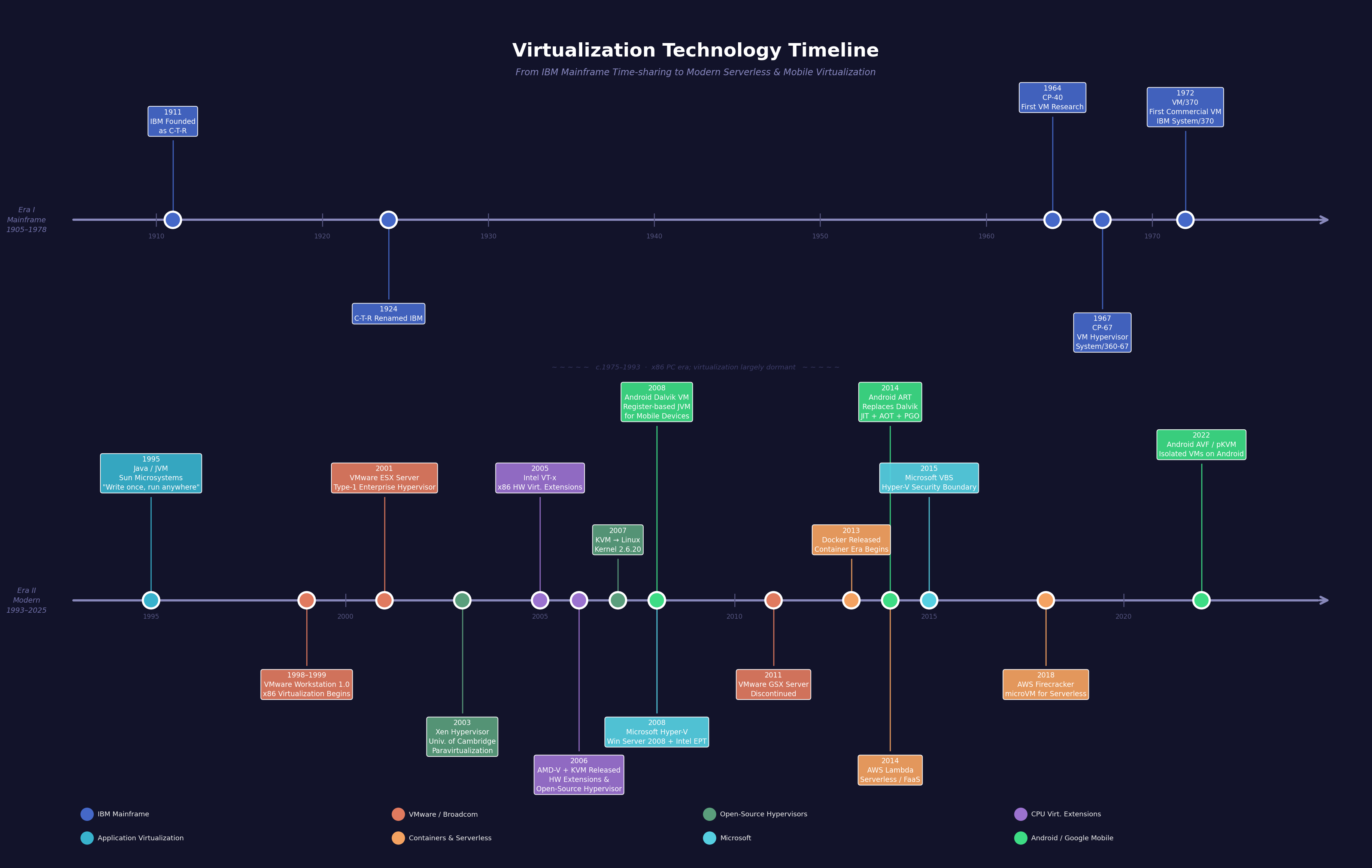
Here is a timeline of the technologies this blog post discusses. As always, this timeline will not remain static but is current as of this writing:
References
U.S. National Institute of Standards and Technology (NIST)
Souppaya, M., Scarfone, K., & Hoffman, P. "Guide to Security for Full Virtualization Technologies." National Institute of Standards and Technology Special Publication 800-125, January 2011. https://csrc.nist.gov/pubs/sp/800/125/final
Chandramouli, R. "Security Recommendations for Server-based Hypervisor Platforms." National Institute of Standards and Technology Special Publication 800-125A Revision 1, June 2018. https://csrc.nist.gov/pubs/sp/800/125/a/r1/final
International Business Machines (IBM)
IBM. "About IBM." https://www.ibm.com/about
IBM. "The Punched Card Tabulator." IBM History. https://www.ibm.com/history/punched-card-tabulator
IBM. "The IBM Logo." IBM History. https://www.ibm.com/history/logo
IBM. "VM/370 History Timeline." IBM VM Website. https://www.vm.ibm.com/history/timeline.html
IBM. "IBM z/VM." IBM Documentation. https://www.ibm.com/docs/en/zvm
IBM. "PR/SM — Processor Resource/Systems Manager." IBM Documentation. https://www.ibm.com/docs/en/zos-basic-skills?topic=prsm-processor-resourcesystems-manager
IBM. "IBM z/OS Container Extensions (zCX)." IBM Documentation. https://www.ibm.com/docs/en/zos-container-extensions
Microsoft
Microsoft. "Hyper-V Technology Overview." Microsoft Learn. https://learn.microsoft.com/en-us/windows-server/virtualization/hyper-v/hyper-v-technology-overview
Microsoft. "Windows Subsystem for Linux Documentation." Microsoft Learn. https://learn.microsoft.com/en-us/windows/wsl/
Microsoft. "Virtualization-based Security (VBS)." Microsoft Learn. https://learn.microsoft.com/en-us/windows-hardware/design/device-experiences/oem-vbs
Oracle Corporation/Sun Microsystems
Oracle Corporation. "Java." https://www.oracle.com/java/
Oracle Corporation. "The Java® Virtual Machine Specification." https://docs.oracle.com/javase/specs
Oracle Corporation. "GraalVM." https://www.graalvm.org
OpenJDK Community. "OpenJDK." https://openjdk.org
Broadcom/VMware
- Broadcom. "VMware vSphere." Broadcom Product Portfolio. https://www.broadcom.com/products/software/vmware/vsphere
Intel, AMD, ARM, Google, QEMU, The Linux Foundation, and The Linux Kernel Organization
Intel Corporation. "Intel® Virtualization Technology (Intel® VT)." https://www.intel.com/content/www/us/en/virtualization/virtualization-technology/intel-virtualization-technology.html
Advanced Micro Devices (AMD). "AMD Virtualization." https://www.amd.com/en/products/processors/server/epyc/amd-virtualization.html
ARM. "Learn the architecture: AArch64 virtualization." Arm Developer. https://developer.arm.com/documentation/102142/latest
Google. "crosvm — The ChromeOS Virtual Machine Monitor." GitHub. https://github.com/google/crosvm
Google. "Android Runtime (ART) and Dalvik." Android Open Source Project. https://source.android.com/docs/core/runtime
Google. "Android Virtualization Framework." Android Open Source Project. https://source.android.com/docs/core/virtualization
Intel Corporation & The Linux Foundation. "Cloud Hypervisor." GitHub. https://github.com/cloud-hypervisor/cloud-hypervisor
The Linux Kernel Organization. "Kernel Virtual Machine (KVM)." https://linux-kvm.org/page/Main_Page
The Xen Project. "About Xen Project." Linux Foundation. https://xenproject.org/about/
QEMU Project. "QEMU: A Generic and Open Source Machine Emulator and Virtualizer." https://www.qemu.org
Cloudflare
- Cloudflare. "What is Software-Defined Networking (SDN)?" Cloudflare Learning Center. https://www.cloudflare.com/learning/network-layer/what-is-sdn/
Amazon Web Services (AWS) and Azul Systems
Amazon Web Services. "Amazon Corretto — Production-Ready Distribution of OpenJDK." https://aws.amazon.com/corretto/
Amazon Web Services. "Firecracker — Secure and Fast microVMs for Serverless Computing." GitHub. https://github.com/firecracker-microvm/firecracker
Azul Systems. "Azul Zulu Builds of OpenJDK." https://www.azul.com/downloads/