I had been thinking for some time about what I wanted to do with my new Arduino UNO Q, a system board that combines both a microprocessor unit (MPU) capable of running a full Linux operating system and a microcontroller unit (MCU) running more "traditional" Arduino microcontroller sketches in C++. I had been playing with Anthropic's Claude and decided I wanted the ability to ask Claude to give me the current sensor readings not only when I'm on my home network but also when I'm away with my phone or my laptop.
The goal was easy to state yet surprisingly involved to build: connect a physical environmental sensor to Claude so it can answer questions about the physical world on demand and remember the history, too. Not just "it's 72°F," but "here's how the temperature and humidity in this room have trended over the last three days." That meant solving two different problems at once: a live path, for the "right now" questions, and a historical path, for trend analysis. Both needed to run through the cloud instead of on-premises, and both needed to be secure enough that my home network wasn't left with an open door.
I began to research how I would make this work. Given that I was working with residential Internet service, I did not want to open my firewall or configure some complex VPN. Given my familiarity with Microsoft Azure, I looked at leveraging its cloud platform. Because I did not want this to become an expensive project, I challenged myself to build this strictly within the Azure free tier's services and limitations.
About the Hardware: Arduino UNO Q and Adafruit BME688
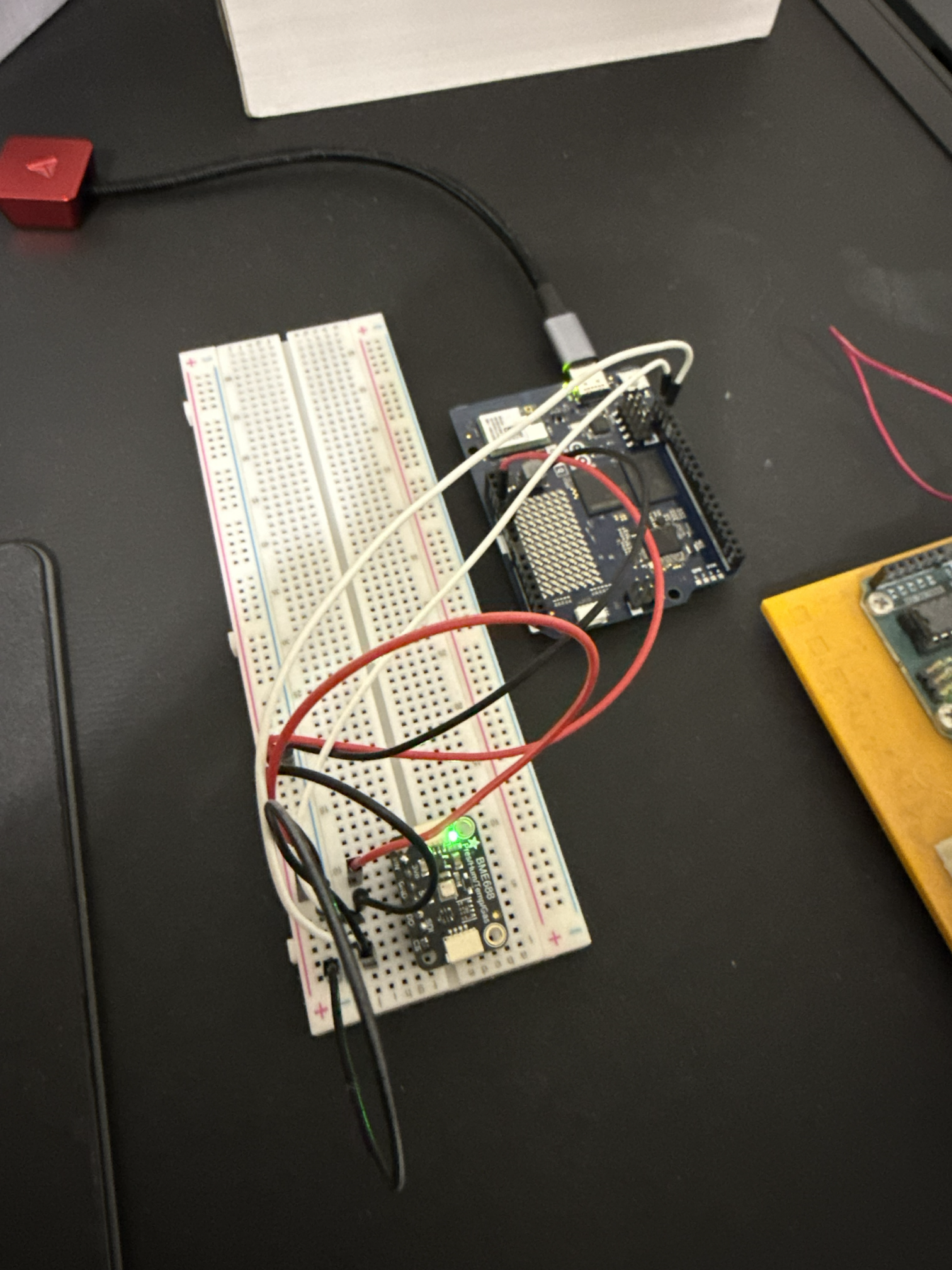
An Arduino UNO Q sits at the center of this project, a peculiar and relatively new board that's really two computers in one: a Qualcomm QRB2210 MPU runs a full installation of Debian Linux, while a separate ARM Cortex M33-based STM32U585 MCU runs ZephyrOS, a Real-Time Operating System (RTOS) developed by The Linux Foundation specifically for running code on constrained devices such as microcontrollers used in Internet of Things (IoT) use cases. The two sides of this board talk to each other internally over a fast Remote Procedure Call (RPC) bridge based on MessagePack.
The UNO Q is capable of running select Large Language Models (LLMs) for locally-hosted AI projects. Additionally, the board is equipped with WiFi 5 Dual-band and Bluetooth 5.1, per the Arduino website. This networking capability allows the Arduino to be independently powered and connected to my network without being tethered to my PC.
Wired to the MCU side is an Adafruit BME688, a sensor capable of reading temperature, humidity, barometric pressure, gas resistance (a proxy for air quality/VOCs), and altitude.
The MCU handles the actual sensor polling in C++. The MPU side runs a Python application responsible for everything else: packaging that data and getting it to the cloud.
Where Azure Comes In
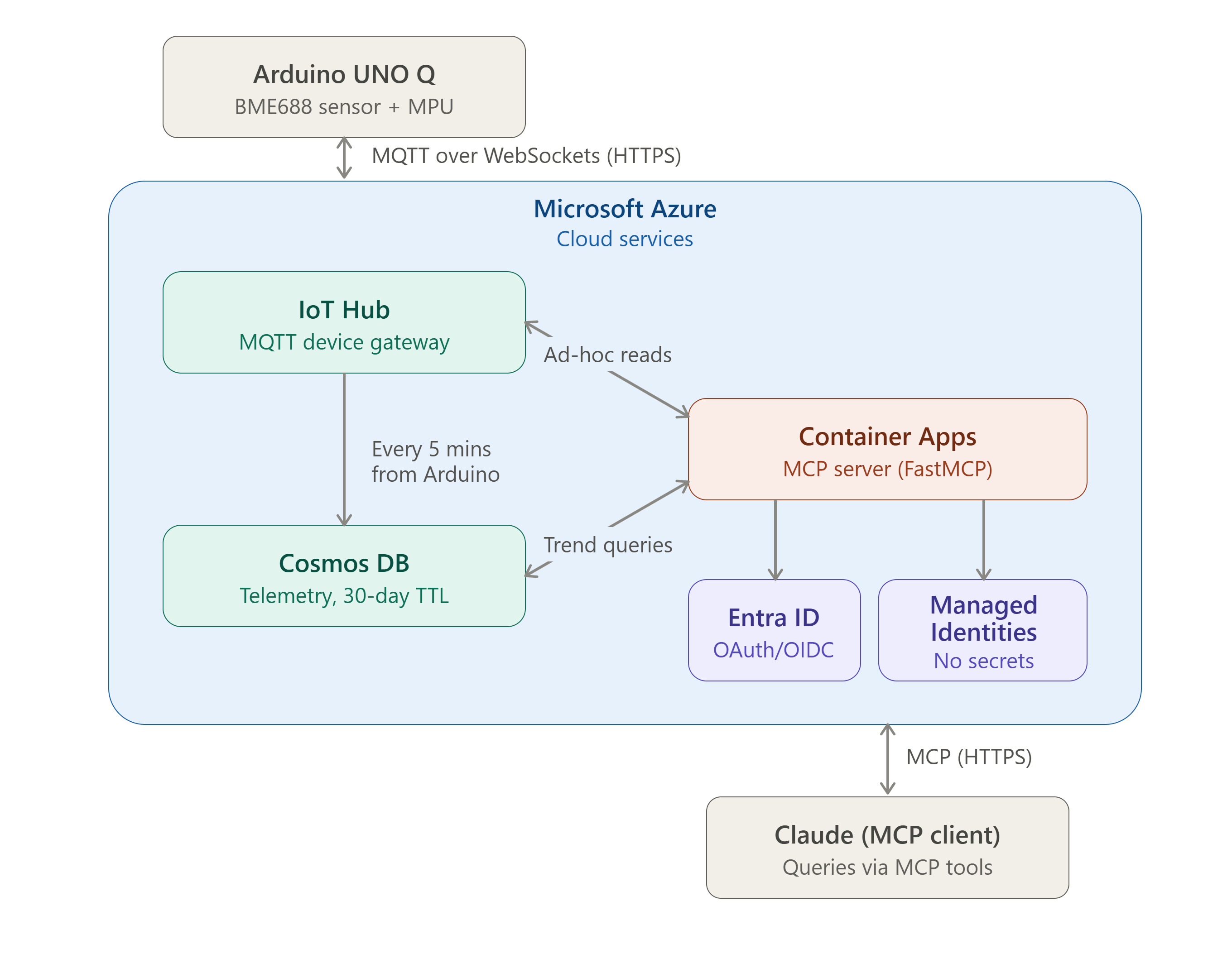
Through some trial and error (and a bunch of reading), I found a pathway that would work. Everything past "the sensor took an on-demand reading" is Azure's job, and the stream splits nicely into two paths that share a single entry point: Azure IoT Hub. Azure's free tier limits you to a single IoT Hub resource per subscription, with room to register up to 500 devices — only one of which, the Arduino, is in use here.
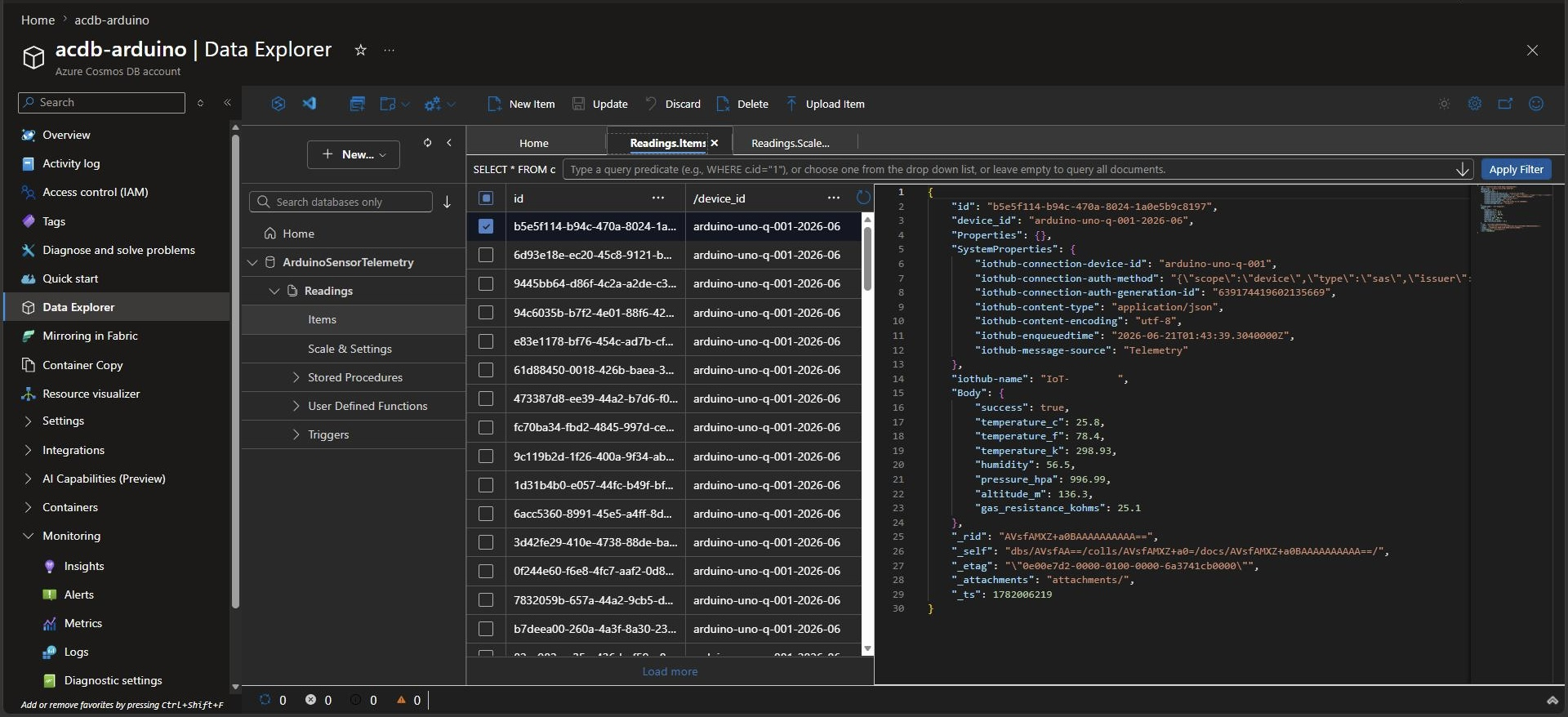
The Python code on the Arduino establishes a secure connection to IoT Hub using MQTT over WebSockets, eliminating the need for special router configurations. The MQTT messages are encapsulated by WebSockets and sent over a standard HTTPS connection, appearing like normal web traffic on the modern Internet. The Arduino polls the sensor for a new reading once every five minutes and sends the data to IoT Hub as a JavaScript Object Notation (JSON) payload.
Claude's on-demand reads are handled through Azure's Direct Methods — a cloud-to-device call that IoT Hub delivers over the Arduino's existing outbound connection, without needing manually managed MQTT topics. The routine telemetry described above, by contrast, flows the other direction: a standard device-to-cloud publish that IoT Hub routes to Cosmos DB. This Direct Methods mechanism is what allows Claude to make a call to my microcontroller.
Not only did I want Claude to call my Arduino for an in-the-moment read of the sensor, but I also wanted Claude to analyze data collected over days to give me insights and trends ("What was the hottest day last week?", "Is it getting warmer?", "Is the humidity increasing on average?"). To do this, I would need to store the data somewhere Claude could access it. I chose a NoSQL database, essentially a JSON document store, to store the sensor readings coming in from the Arduino. Azure's Cosmos DB ended up being a perfect fit and was free for a small project with only a small amount of data being sent. Cosmos DB stores this as a rolling 30-day window of telemetry, enough history for meaningful trend queries without stockpiling data forever.
Turning It Into Something Claude Can Use
None of this matters to an AI assistant unless it's exposed as a tool it can actually call. That became the responsibility of a small Python-based Model Context Protocol (MCP) server. For Anthropic's infrastructure to be able to reach the MCP server and its tools, I initially planned to host the code as an Azure Function. However, while I could feasibly do this within Azure's free limitations, Azure Functions requires a Storage Account, which is not free (even if it would cost me pennies per year). After some digging, I decided to containerize the Python codebase and deploy it as a locked-down application environment on Azure Container Apps. The container is configured to scale to zero when idle (i.e., the container and MCP server inside it are offline if the container is idle beyond 60 seconds). This decision eliminated unnecessary compute usage that would otherwise incur monetary cost if left to run full-time. The only cost is a few more seconds for Claude to respond to my prompt as the container comes online to service the request.
The MCP server exposes four tools for Claude to call upon:
- Device status: is the Arduino online and reachable?
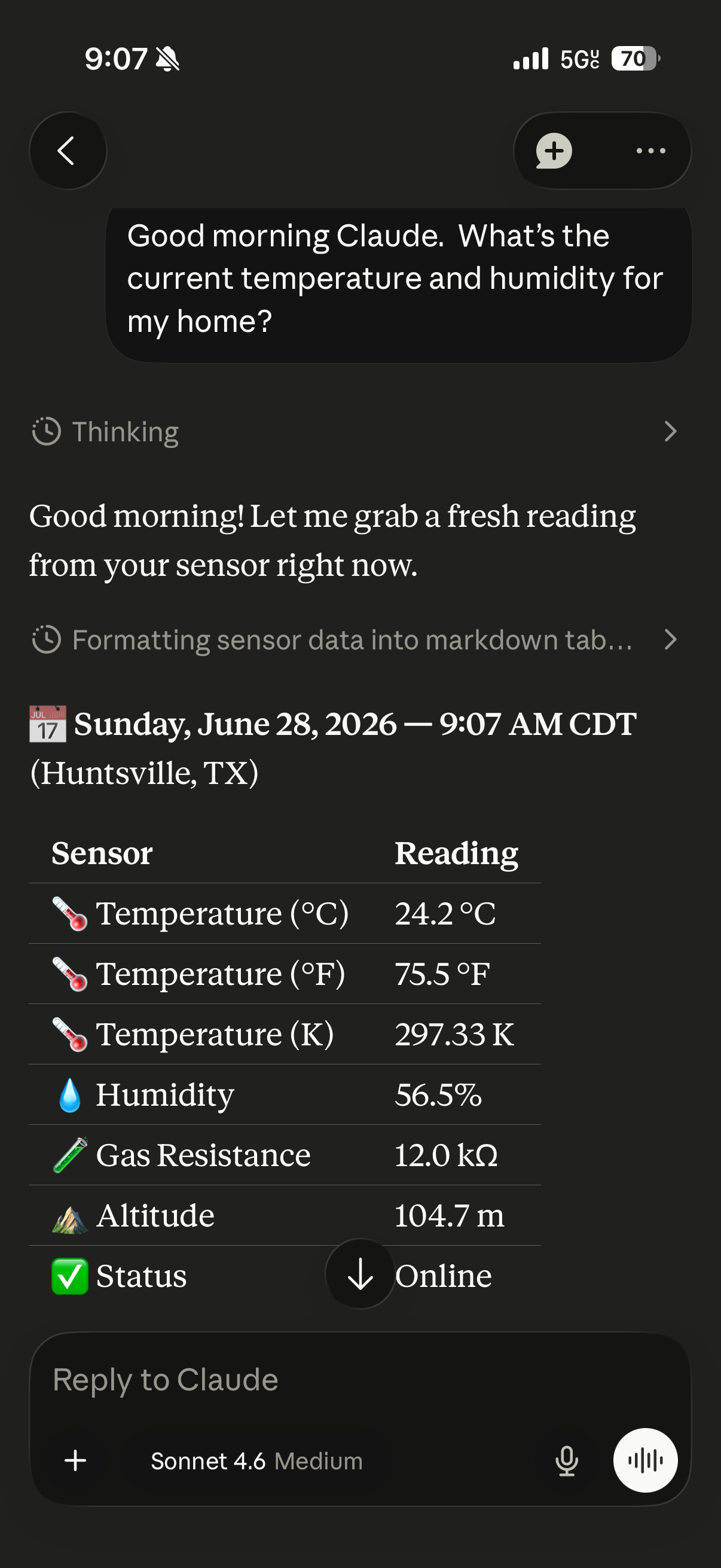
- Ad-hoc sensor reading: force a fresh read, right now
- Most recent reading: the latest pushed telemetry value in Cosmos DB
- Historical trend: pull a window of Cosmos DB history for analysis
I built the container itself locally on my Windows 11 PC, pushed it to Docker Hub, and had Azure pull it in with a Personal Access Token.
Putting it all together:
Locking It Down
A project like this exposed to the Internet, however minimal and non-sensitive its nature, still warrants reasonable safeguards. A few decisions did the heavy lifting here:
- Microsoft Entra ID (formerly Azure Active Directory, or Azure AD) handles authentication with a spec-compliant OAuth 2.0/OIDC flow — including proper protected resource metadata and JWT validation via JWKS. Presently, the OAuth/OIDC flow is switched off while a compatibility issue on the client side gets sorted out, but the implementation is done and ready.
- Managed Identities replaced connection-string and SAS-token authentication entirely for both Cosmos DB and IoT Hub, with least-privilege RBAC roles instead of broad access, meaning there are no secrets sitting in config files waiting to leak.
- IoT Hub's outbound-only MQTT connection means the device reaches out to Azure, never the other way around. No inbound port ever needs to be opened on the home network: it's all HTTPS traffic on TCP 443.
- An IP allowlist only permitting Anthropic's outbound public IP space to contact my MCP server's container adds one more layer on top.
The Results
Lessons Learned (there were quite a few but here's the highlights)
The most valuable parts of a project like this are often the detours. Migrating both Cosmos DB and IoT Hub off connection strings and onto Entra ID with real least-privilege roles turned into its own deep dive. So did discovering that Arduino's App Lab platform runs each Python app inside its own isolated Docker container, a detail that surfaced while investigating a remote soft-reboot feature that I could ask Claude to perform. That feature is now fully designed but intentionally shelved for later.
Next Steps
The project's working name always pointed toward a dual-cloud future — a "zero-cost" AWS-mirrored path is still on the drawing board — but that's a story for another post.